Tracking expenses in two currencies without losing the plot
The mistake is not in the conversion. It is in saving the expense already converted and losing what it actually cost.
In short
To track expenses in two currencies, store every expense in the currency it happened in and convert only for the total, at the day's rate. An app that converts on save and discards the original amount rewrites your history every time the rate moves: the same May costs a different amount depending on the day you look at it. Pick one reference currency for totals and do not keep changing it.
Earning in dollars and spending in the local currency is the normal situation for anybody who has moved country, and for plenty of people working for clients abroad. It is also where most expense apps start lying to you.
The problem is not converting, it is when
There are two ways to save a 500-peso expense when your reference currency is the dollar.
The first: save "27 dollars" and forget the pesos. Fast, and wrong — next month the rate moves and that expense still says 27 dollars when today it would be 24. Worse, if the app recalculates, the expense changes size on its own, and your May looks different every time you open it.
The second: save "500 pesos" and, separately, the conversion at that day's rate. The expense is fixed — it cost 500 pesos and always cost 500 pesos — and the dollar total is computed when it is needed. This is the only version that does not rewrite the past.
That is the detail to check before installing anything. If you can only pick one currency and everything else is converted, your history is an estimate rather than a record.
Choose a reference currency once
You need a single number for "how much do I have", and that number has to be in one currency. Make it the one you think in for large decisions: if you are saving to move, the destination's; if you live and spend here, the local one.
Switching it every so often is what ruins month-to-month comparison. Choose once.
One account, one currency
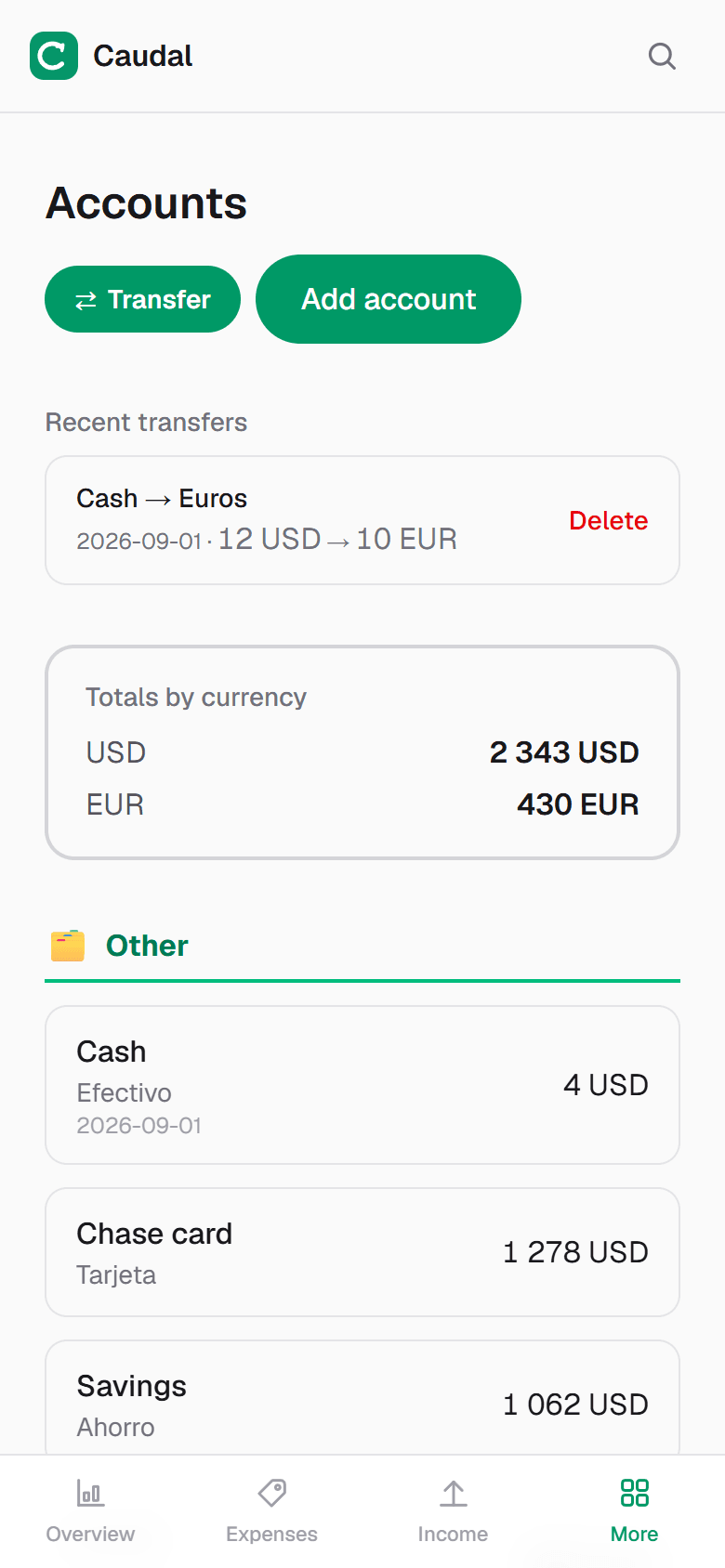
Each account — cash, card, a dollar account — has its own currency and its own balance in it. The converted total is a view, not a stored value.
It sounds obvious and almost no home-made spreadsheet respects it: the usual sheet has one amount column, pesos and dollars both go in, and the sum stops meaning anything.
What to look at each month
Three numbers, in this order:
- The total in your reference currency. It rises and falls with the rate even when you spend nothing. That is information, not an error.
- How much you hold in each currency separately. That is what tells you whether local liquidity is short, which is the real problem when rent is due.
- What you spent this month, also converted, so it can be compared with last month.
The case that trips everybody up: moving money between your own currencies
Changing 300 dollars into pesos is neither an expense nor income: it is a move. Recorded as an expense on the dollar account and income on the peso one, your month shows a huge expense that never happened and income that did not either.
Record it as a transfer between accounts. The total does not change — the money changed pocket, not owner — and neither your spending nor your income for the month gets dirty. The spread the exchange kept is a real cost, and that one belongs as an expense.
How much work this is
Ten seconds per expense, the same as with one currency: you pick the account and the currency comes with it. The only addition is choosing your reference currency once, at the start.
Common questions
- Which exchange rate should I use?
- The day's rate for the expense, and today's rate for totals. If the app updates rates daily you never think about it. What does not work is a fixed rate typed in by hand six months ago.
- How do I record a currency exchange?
- As a transfer between two of your own accounts, never as an expense plus income: the money changed pocket, it did not leave your net worth. The spread the exchange kept is a genuine expense.
- Can a spreadsheet handle this?
- It can, if you build a currency column and a table of rates by date, and maintain it. In practice almost nobody maintains it, and a single amount column with mixed currencies gives sums that mean nothing.
- Can I hold crypto in the same budget?
- Yes, under the same rule: stored in its own unit, converted for the total. What differs is volatility — read that total knowing it moves on its own.
Try it on your own money
Caudal is an expense tracker in Spanish, English and Russian. Several currencies, goals, debts, a shared household budget. Recording an expense takes three seconds.
Start free